Spark in Action 3: Runtime, Scheduling, and a Real-Time Processing Example
This is the third post in my notes on Spark in Action by Petar Zečević and Marko Bonaći. In this post, I will summarize the runtime components and scheduling methods that make up a Spark application, and finally look at a real-time dashboard example.
While the previous posts covered RDDs, partitioning, and shuffling, this post is closer to how Spark actually runs on a cluster.
Spark Runtime Components
A Spark application runs through the collaboration of several runtime components.
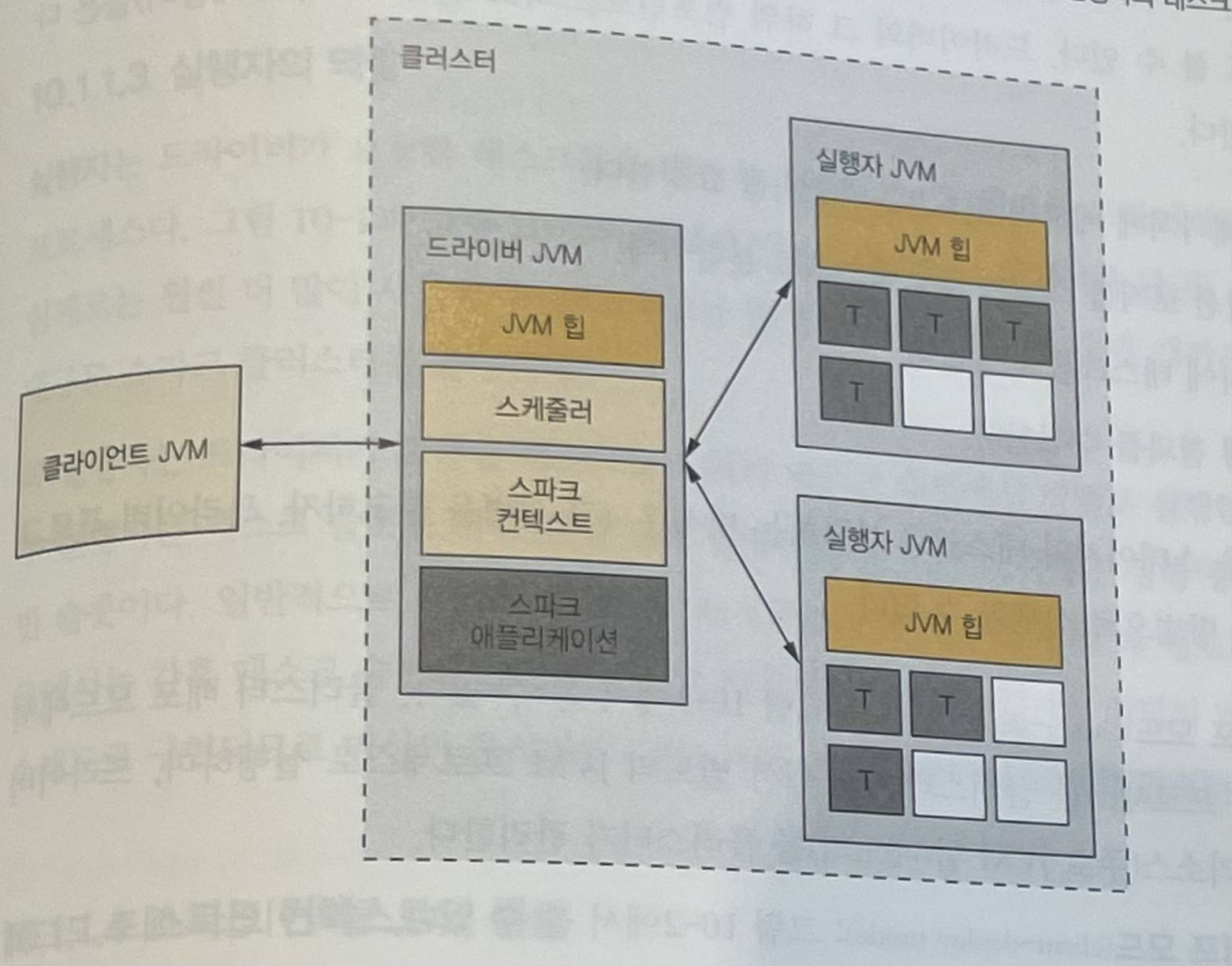
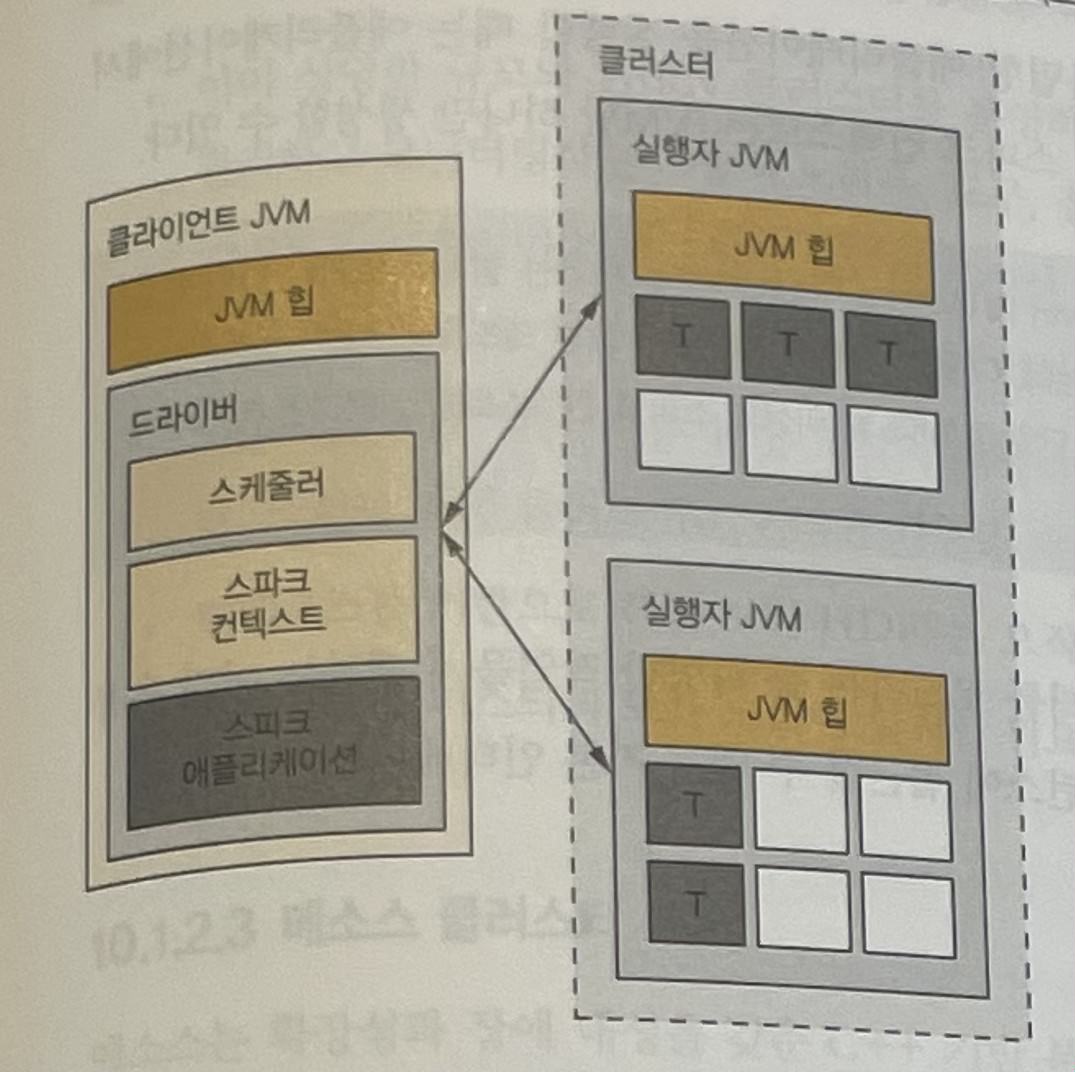
Client
The client is the entity that starts the driver. Examples include spark-submit, spark-shell, and custom applications using the Spark API.
Driver
The driver is a kind of wrapper that exists once per Spark application.
The driver is responsible for the following.
- Request memory and CPU resources from the cluster manager.
- Split application logic into stages and tasks.
- Send tasks to multiple executors.
- Collect task execution results.
Deployment mode can be divided into two types depending on where the driver runs.
Cluster Deployment Mode
In cluster deployment mode, the driver is separated from the client.
The driver runs inside the cluster as a separate JVM process. Therefore, resources for the driver process, such as JVM heap memory, are managed by the cluster.
Client Deployment Mode
In client deployment mode, the driver runs in the client’s JVM process.
Executor
An executor is a JVM process that executes tasks requested by the driver and returns results back to the driver.
An executor runs tasks in parallel across multiple task slots. In general, task slots are implemented as threads, so they are said to be configured at around two to three times the number of CPU cores.
SparkContext
SparkContext is the basic interface for accessing a Spark runtime instance. The driver creates and starts a SparkContext instance.
When running an application through the Spark API, the application must start SparkContext directly.
Only one SparkContext can be created per JVM. There is an option to use multiple contexts, but it is closer to a testing feature and is generally not recommended.
Scheduling
Spark scheduling can be viewed from three perspectives.
- It schedules executor, JVM process, and CPU task slot resources.
- The cluster manager allocates CPU and memory resources to each executor.
- Job scheduling is executed inside the application.
Cluster Resource Scheduling
Cluster resource scheduling is the process of allocating resources to executors of multiple Spark applications running on a single cluster.
The cluster manager starts, stops, and restarts processes, and limits the maximum number of CPU cores available to each executor.
The cluster manager does the following.
- Starts executor processes requested by the driver.
- Starts the driver process as well when using cluster deployment mode.
Executors are not shared between applications. Therefore, if multiple applications run simultaneously on a single cluster, resource contention can occur.
Spark Job Scheduling
Spark job scheduling is the process of scheduling CPU and memory resources for running tasks inside a single Spark application.
The driver has several scheduler objects. Once executors are running, it decides which executor will run which task.
Multiple jobs sharing the same SparkContext compete for executor resources. SparkContext is thread-safe.
Job scheduling determines CPU resource usage in the cluster. It also indirectly affects memory usage, because running more tasks in a single JVM uses more heap memory.
CPU resources are managed at the task level. Memory resources, on the other hand, are managed by dividing them into multiple segments.
FIFO Scheduler
The FIFO scheduler lets the job that requested resources first occupy as many task slots as it needs.
If the job that started first does not use many resources, other jobs can also run simultaneously. But if the first job needs to occupy all resources, the next job must wait until the existing job has used them.
FAIR Scheduler
The FAIR scheduler distributes resources evenly in a round-robin manner.
Even if a job requests task slots later, it does not necessarily have to wait until a long-running job completes.
Using scheduler pools allows weights and minimum shares to be configured. If a weight is set, jobs in a particular pool can receive more resources than jobs in other pools. The minimum share is the minimum number of CPU cores that each pool can always use.
Speculative Execution
Speculative execution is a feature for reducing the problem of straggler tasks, which take unusually longer than other tasks in the same stage.
Spark can request the same task processing the same partition data on another executor as well. If the existing task is delayed and the speculative task completes first, Spark uses the result of the speculative task to reduce overall job latency.
Related settings include the following.
spark.speculation = true: enables speculative execution.spark.speculation.interval: the interval for checking whether speculative tasks should be launched.spark.speculation.quantile: the progress ratio of tasks that must be completed before speculative tasks are launched.spark.speculation.multiplier: the criterion for determining how delayed an existing task is.
However, speculative tasks must be used carefully. For example, if the task writes data to a database, the same data may be written twice.
Data Locality
Data locality is a strategy for running tasks on executors located as close as possible to the data.
Preferred Locations
Spark has hostnames or executor lists that store partition data for each partition. It can use this location information to run computation close to the data.
However, preferred location information is available only for RDDs created from HDFS data and cached RDDs.
HDFS RDDs retrieve location information from the HDFS cluster through the Hadoop API. For cached RDDs, Spark directly manages the executor locations where each partition is cached.
Data Locality Levels
When Spark cannot secure the best task slot, it waits for a certain amount of time. If it still cannot secure one, it tries scheduling to the next-best location.
Depending on where a task runs, data locality levels are divided as follows.
PROCESS_LOCAL: runs on the executor that cached the partition.NODE_LOCAL: runs on a node that can directly access the partition. This is a location that can access the data without going through the network, and another executor on the same machine may fall into this category.RACK_LOCAL: runs on another machine mounted in the same rack as the machine storing the partition. Since only YARN can refer to rack information in the cluster, this level is possible only on YARN.NO_PREF: no preferred location exists. The data can be accessed at the same speed from anywhere in the cluster.ANY: runs the task in another location when data locality cannot be secured.
Here, a rack is a standard-sized frame for mounting servers and network equipment. Within the same rack, even if data is transferred over the network, it only needs to pass through the switch.
Memory Scheduling
Memory scheduling is the process in which the cluster manager allocates memory to executor JVM processes, and Spark manages memory used by jobs and tasks.
Memory Managed by the Cluster Manager
The memory allocated to an executor is configured with spark.executor.memory.
Memory Managed by Spark
In Spark 1.5.2 and earlier, executor memory was divided to store cached data and temporary shuffle data. Because usage in the divided memory regions could exceed their limits, a safety ratio was defined. The default allocation used 54% for cache, 16% for shuffling, and the remaining 30% for other Java objects and resource storage.
Starting with Spark 1.6.0, memory is managed in a unified way. Therefore, if there is no shuffling, the cache may occupy the entire memory. However, the area occupied by execution memory cannot be converted into the storage memory area.
Example: Real-Time Dashboard
Finally, I will summarize a real-time dashboard example.
class KafkaProducerWrapper(object):
    producer = None

    @staticmethod
    def getProducer(brokerList):
        if KafkaProducerWrapper.producer == None:
            KafkaProducerWrapper.producer = KafkaProducer(
                bootstrap_servers=brokerList,
                key_serializer=str.encode,
                value_serializer=str.encode
            )
        return KafkaProducerWrapper.producer

if __name__ == "__main__":
    # ... omitted

    # data key types for the output map
    SESSION_COUNT = "SESS"
    REQ_PER_SEC = "REQ"
    ERR_PER_SEC = "ERR"
    ADS_PER_SEC = "AD"

    requests = reqsPerSecond.map(lambda sc: (sc[0], {REQ_PER_SEC: sc[1]}))
    errors = errorsPerSecond.map(lambda sc: (sc[0], {ERR_PER_SEC: sc[1]}))
    finalSessionCount = sessionCount.map(
        lambda c: (
            long((datetime.now() - zerotime).total_seconds() * 1000),
            {SESSION_COUNT: c}
        )
    )
    ads = adsPerSecondAndType.map(
        lambda stc: (stc[0][0], {ADS_PER_SEC + "#" + stc[0][1]: stc[1]})
    )

    # all the streams are unioned and combined
    finalStats = finalSessionCount \
        .union(requests) \
        .union(errors) \
        .union(ads) \
        .reduceByKey(lambda m1, m2: dict(m1.items() + m2.items()))

    def sendMetrics(itr):
        global brokerList
        prod = KafkaProducerWrapper.getProducer([brokerList])
        for m in itr:
            mstr = ",".join([str(x) + "->" + str(m[1][x]) for x in m[1]])
            prod.send(
                statsTopic,
                key=str(m[0]),
                value=str(m[0]) + ":(" + mstr + ")"
            )
        prod.flush()

    # Each partition uses its own Kafka producer to send formatted messages.
    finalStats.foreachRDD(lambda rdd: rdd.foreachPartition(sendMetrics))

    print("Starting the streaming context... Kill me with ^C")

    ssc.start()
    ssc.awaitTermination()
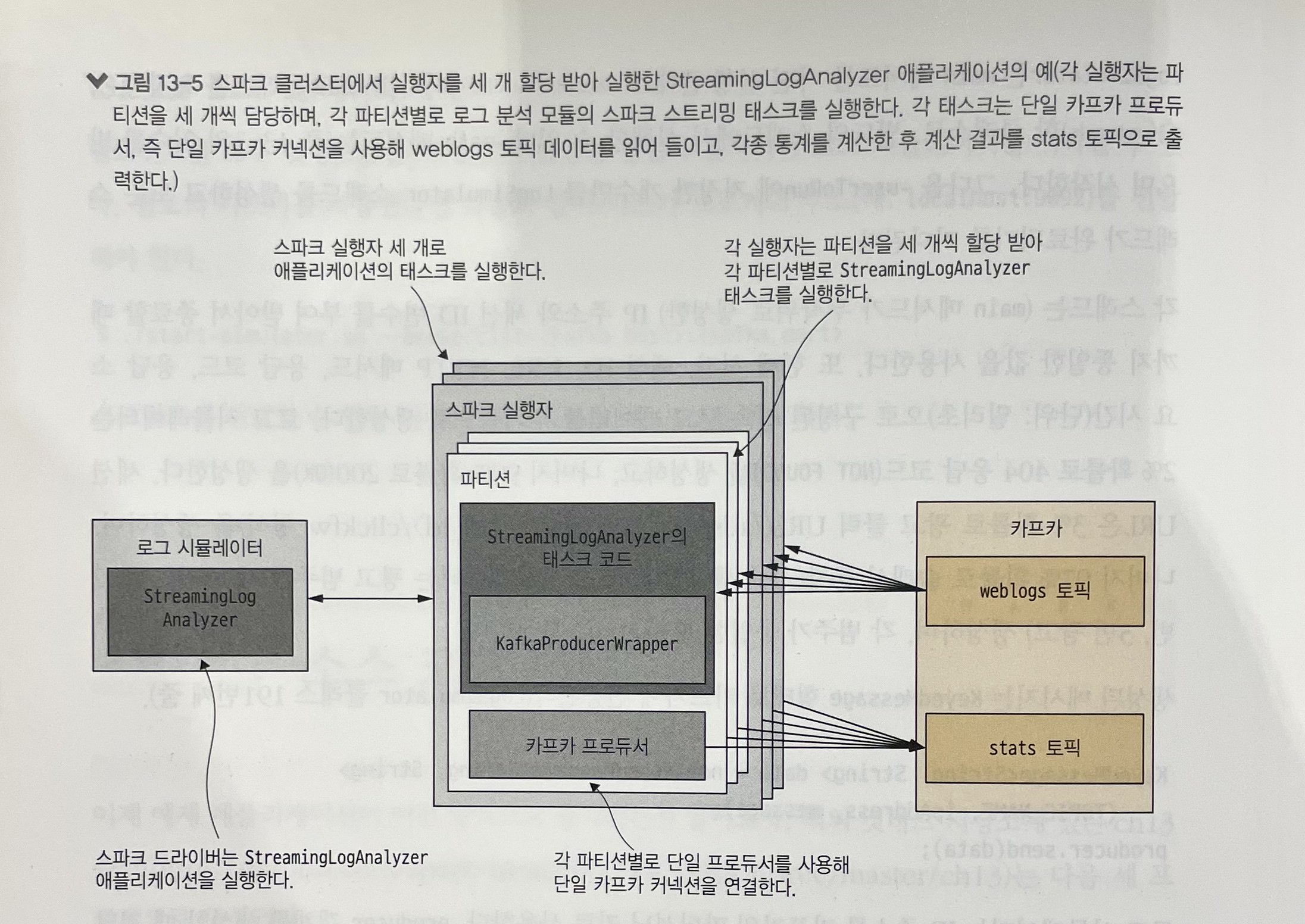
In this example, the number of active sessions is processed in one-second mini-batches, so results keyed by per-second timestamps are combined and sent to Kafka.
The Kafka producer object initialized in the driver cannot be sent to workers. Instead, the producer is initialized inside tasks that run on workers.
Scala’s KafkaProducerWrapper companion object creates a single instance through lazy instantiation and initializes a single Kafka producer instance.
Using foreachPartition, a producer object can be initialized once per JVM and used to send messages to Kafka. Since multiple partitions share the same executor JVM, the producer object can also be shared.
Closing
In this post, I summarized Spark runtime components, resource scheduling, data locality, memory scheduling, and a real-time dashboard example.